Category Archives: Blog

Dashboards

Dashboards offer key insights into KPIs (Key Performance Indicators) of various Supply Chain facets. Currently, there are 11 standard dashboards available on InSync Cloud

  1. Management Overview
  2. Fulfillment Overview
  3. Inventory Overview
  4. Production Overview
  5. Capacity Overview
  6. Sourcing Overview
  7. Distribution Overview
  8. Messages Overview
  9. Root Cause Overview
  10. Alerts
  11. Status Overview
  12. Plan Regression KPIS

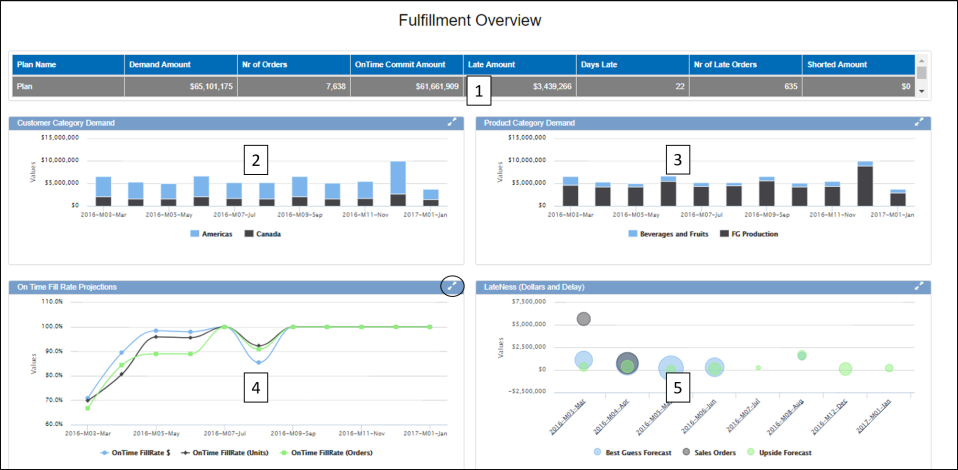
The data in  dashboards are visualised through a combination of grids,charts, pie charts, heat charts etc. A sample dashboard is shown below
Dashboard v41811.png

In the above example of a Fulfillment Dashboard, there are two components. 2,3,4 & 5 are different types of charts that show data based on the selection in component 1.

Clicking on the double arrow button expands any component to full screen

Dashboard Navigation

It is common for most dashboards to have a grid at the top with a high level data summary that drives the other components to show the relevant data.

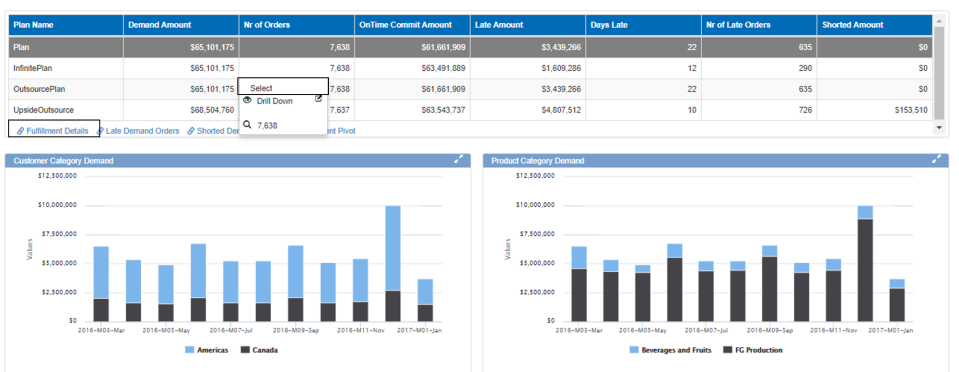
Clicking on any row and selecting the row will refresh the data components below to show the relevant information

For some grids, there are also links to other workbench that are relevant to this data. In the below example, from the fulfillment dashboard there are links to open Fulfillment details, late orders and shorted orders. These links can be found just below the grid with the link icon.
Dashboard Selection v41811.png

Dashboard Settings

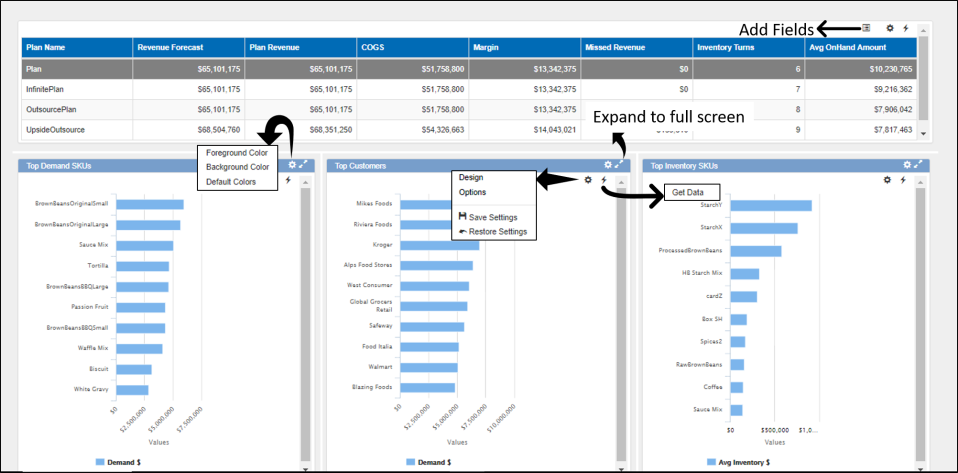
The dashboard settings are accessed through the wheel icon at the top right corner which is only visible on mouse hover.
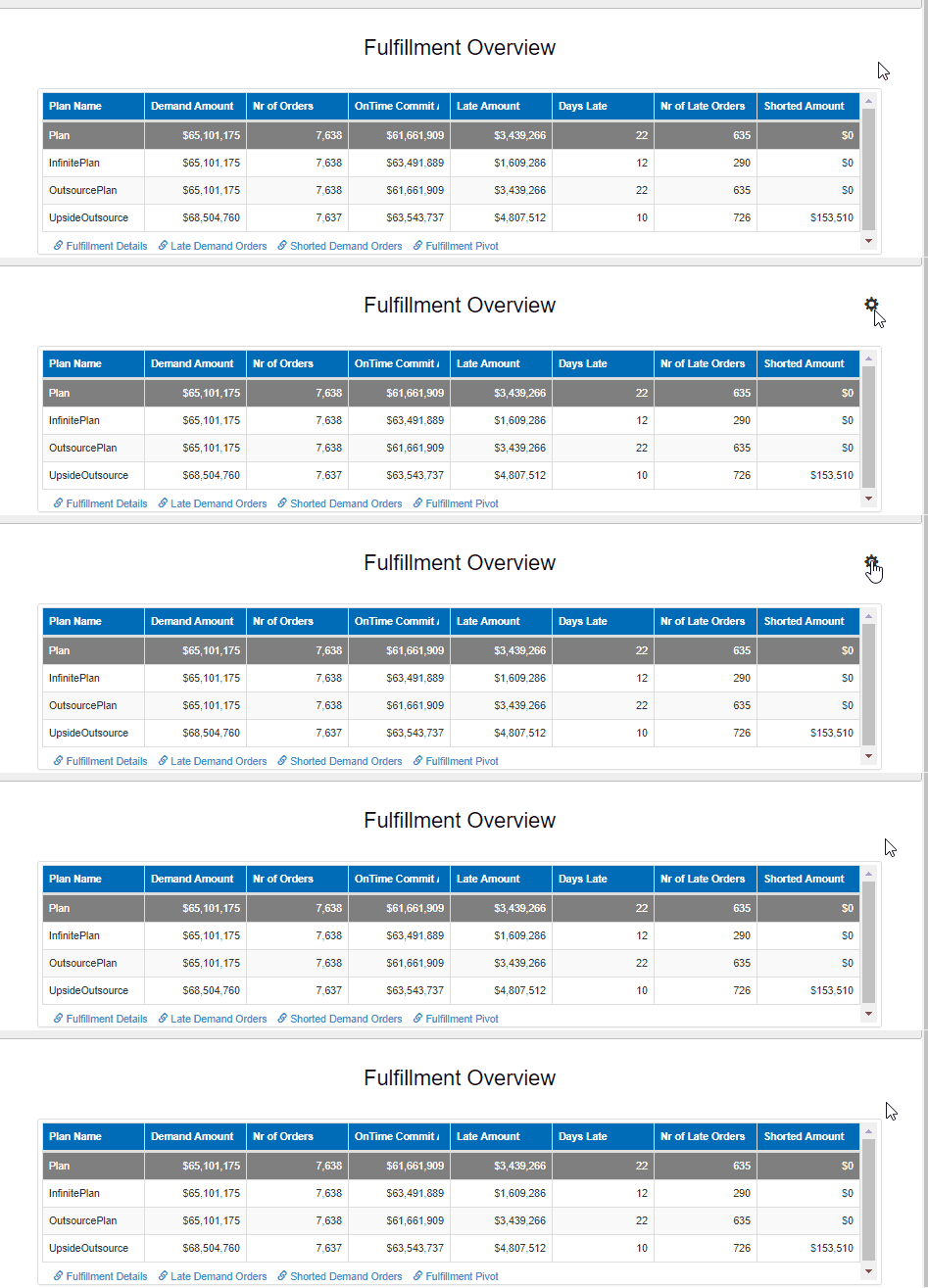
Dashboard settings v41811

Click on the wheel icon to navigate to different controls of the dashboard

  • Get Data – Refreshes the data in the dashboard
  • Show Configurations – Brings up the configuration options for all the components of the dashboard
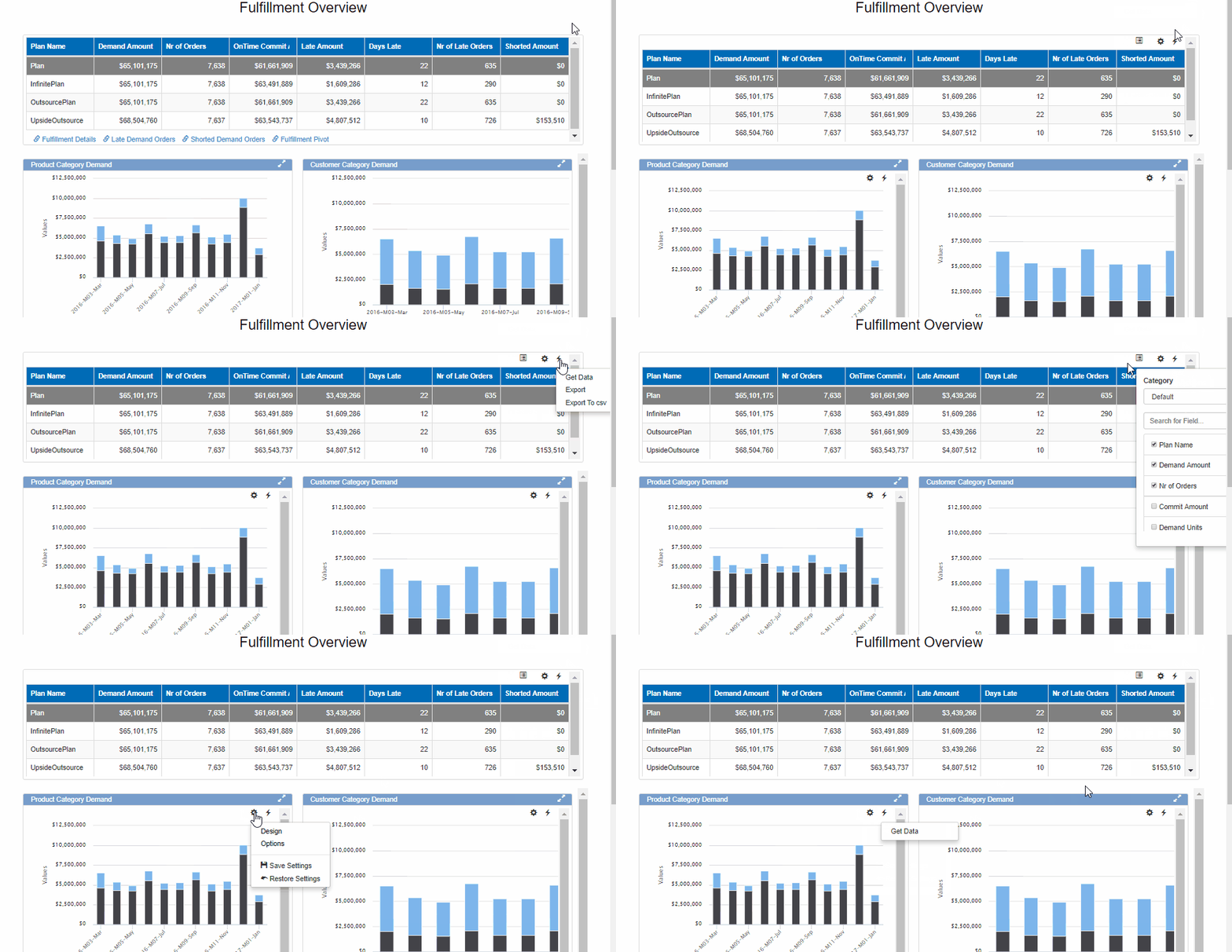
Dashboard show configurations v41811.gif

  • Edit – This allows to control the caption, height, width , color settings and security of the dashboard components
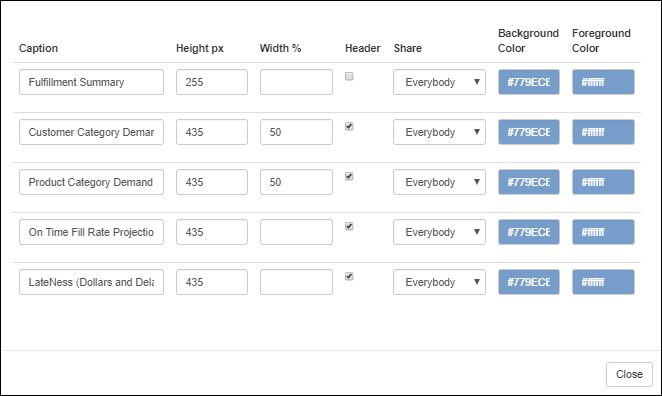
Dashboard Edit v41811.png

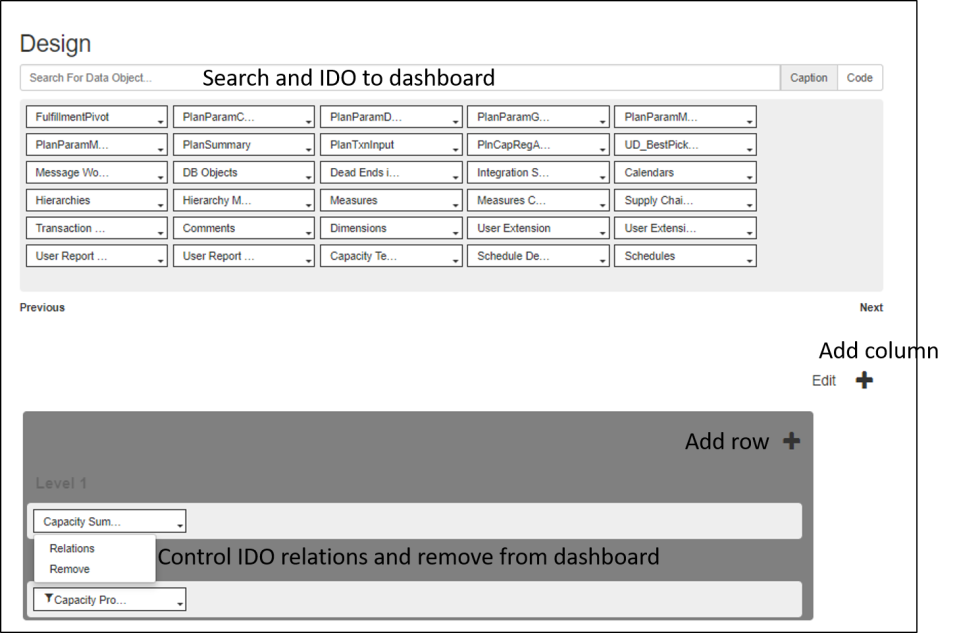
  • Design – In design, the layout of the dashboard can be configured as well as add more components to the dashboard(Admin users only)
    • Search and add IDO to dashboard through the search box at the top
    • Click on the “+” button to add column dashboard and within the dashboard click on the “+” button to add more rows(seen in picture below)
    • Click on the Edit button to set default height and delete components
    • Click on existing IDO within dashboard to add relations or remove it from dashboardDashboard Edit page v41811
  • Save Layout – Saves any layout changes made to dashboard
  • Save settings – Saves any setting changes made to dashboard
  • Clear layout – Clears any recent changes made to dashboard to revert to original layout

Show Configurations

After clicking on the show configurations, the configuration options for each component within the dashboard are visible. The following can be controlled through these

  • Color settings
  • Adding fields
  • Settings/Options for grid/charts
  • Refresh data
  • Export for grids
  • Expand component to full screen

Dashboard all configurations v41811.png


New Study: ERP vs Best of breed APS solutions

San Francisco, June 20, 2014 – Recent study conducted by Supply Chain Insights Founder and CEO, Lora Cecere highlights, best of breed supply chain planning (SCP) providers are taking over ERP Expansionist’s. Her research shows that best of breed SCP companies deliver higher value, implements faster, achieve a quicker Return-on-Investment (ROI), and overall better customer satisfaction.

Here is the link to the article: WAS INTEGRATED PLANNING A HOAX?


About InSync

InSync Inc is the leading innovator in the field of Advanced Planning Systems (APS) – helping companies improve their operational performance. Based in San Francisco, California, InSync’s mission is to deliver innovative, intuitive, integrated and implementable solutions. For more information, please visit http://www.insyncinc.com.

Heuristics vs. Linear Programming (LP): Why Heuristics are better for solving complex supply chain planning problems in a Tactical time Horizon?

The question: “Which  is better; LP or Heuristics?  Wouldn’t a LP solution yield the optimal plan whereas heuristics results come somewhat close?”.

We keep getting these questions.  My answer is that in most short term planning situations, where plan results have direct impact to execution, Heuristics based solutions have far greater advantages over LP based solutions. Here are some of the advantages that I have seen:

  1. Modeling Realistic constraints:  Heuristics based algorithms offer much more flexibility in adding detailed constraints to the model.  Although modeling such constraints is possible in LP, getting the results in a realistic time would be a challenge.  Most solution vendors that provide LP based solutions make assumptions and simplify the problem.  Consequently, the plan is no longer representative of the customer’s problems and business.  One of the common simplifications is modeling discrete manufacturing as non-discrete manufacturing, because of the limitations of linear programming.  Moreover, details and modeling of constraints like Campaign planning, WIP management, shipping calendars, are far from reach for a LP based solution.
  2. Transitional Stability:  Most LP based solutions start from a clean slate, but in most instances, such planning results causes a numbers of problems:
    1. There is a lot of variability in the output.  Huge variances from plan to plan in many instances, cause organizations to lose faith in the system
    2. Interaction with other systems:  Planning results should take input from other systems into consideration.  This includes schedules created by scheduling systems/ MES, as well as manual modifications
  3. Root Cause Analysis:  LP is black box solution.  It is difficult, if not impossible to tell the specific reasoning for a certain result.  I have seen a number of instances where planners lose trust in the system because it is not easy to explain why the results are a certain way.  Secondly, since the results cannot be explained in an easy manner, it is difficult to assign accountability to the plan results.
  4. Performance:  LP algorithms take significantly longer to run than heuristics based solutions.  Hours compared to minutes.  With the speed of a heuristics based solutions, planners have much more flexibility to run a number of “what-if” scenario analysis using varying parameters such as demand, supply, capacity, etc.
  5. Business Workflows:  Heuristic solutions enable a level of interactive planning that is not possible for a LP based solution.  Workflows where users review the plan, freeze a certain part of the plan, perform quick reruns, etc are not a viable option in a LP based solution.

In conclusion, in the short horizon the key is not which solution yields a more optimal solution. Any plan is no longer perfect the moment it is generated, due to the continuously changing circumstances. It is more important, to go with a solution that helps you to proactively plan and change course with the changing conditions.  To this, I contend that the solution needs to contain speed, integrated analytics and modeling flexibility.

So the question is, is there an instance where LP based solutions are better suited in supply chain planning?  The answer to this question is yes.  LP based solutions are generally suited for longer term planning where the objective is to determine major investments, product strategy, long term supplier contracts, Asset Optimization etc.  This is the topic of discussion for another blog. Stay tuned.

Introduction to InSync’s iPlanner

iPlanner is InSync’s advanced planning solution developed with a vision to provide customers with an innovative, intuitive, integrated, and implementable solution for their complex supply chain requirements.  iPlanner, which is a single application with capabilities to support an organizations complete supply chain needs, enables a true synchronized  decision process across departments.   The solution leverages the standard Microsoft .Net architecture, it has a familiar look and feel of Microsoft office and its business driven and intuitive user interface is easy to use and personalize, and has low IT maintenance. In addition, it is scalable, and quick to implement, thereby providing a significantly lower Total Cost of ownership compared to other software solutions in the marketplace.

Key Benefits of iPlanner:

  1. Integrated  analytical solution giving the ability to
    1. evaluate plan instantaneously (Reduced cycle times)
    2. compare plan vs.  actual.
    3. plan quality evaluations.
  2. Simplified built in integration requiring significantly less integration effort.
  3. Ability to maintain and manage multiple what-if plans.
  4. Microsoft Office “look and feel” significantly reduced training effort and change management.
  5. Local business rules which can be applied to different product groups.
  6. Collaborative planning and analysis workflows within and outside the organization.

For more details on iPlanner’s capabilities on Strategy & Risk Management, Sales & Operations Management, Demand Management, Supply Chain Management, Factory Planning and Scheduling solutions, please check out InSync website at http://www.insyncsoft.com  or contact our representative.